
The booking screen is the most used part of Client Diary. As such we’ve re-worked an updated version which we’ll be dropping tomorrow morning. Have a read below to get the highlights that will improve your experience.
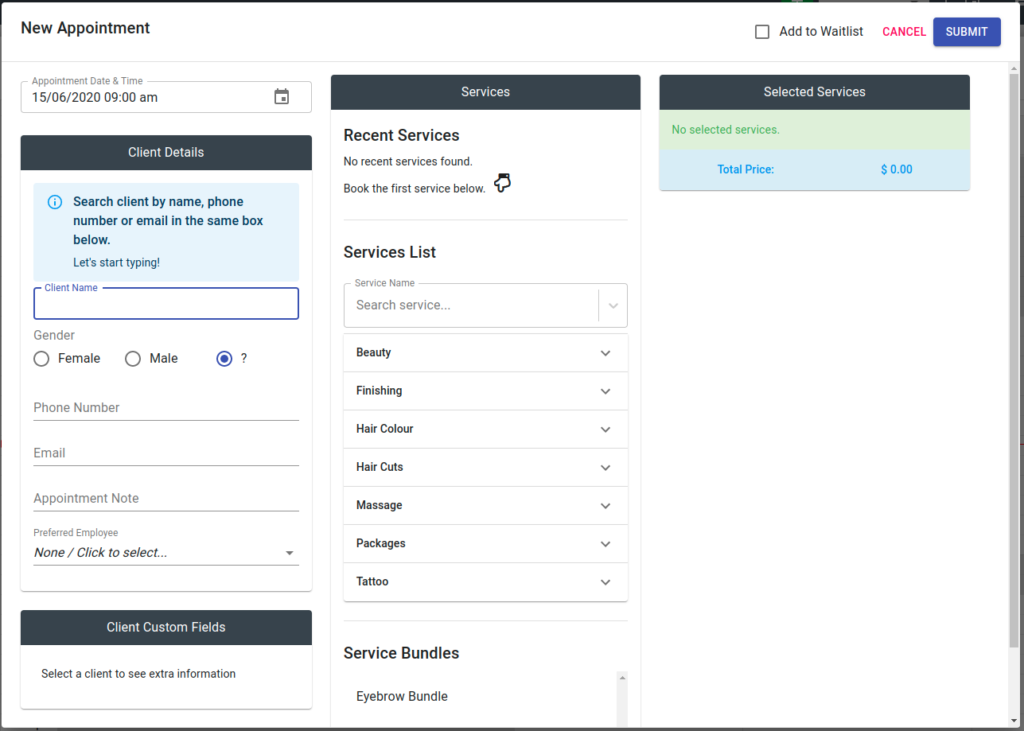
Search by Anything
You can now search by your client’s name, phone number or even email. Just start typing and the system will work out what you’re looking for and return your desired client quickly.

Intelligent Fuzzy Search
Searching is now done by simply typing part of the client’s name and pressing Enter on the keyboard.
With a new, intelligent fuzzy search, Client Diary will look for partial text in first name, then last name. If it can’t find that spelling it will then look for similar spelling. If it still can’t find anything it will even try to find acronyms!

Improved layout
The layout has been subtly adjusted to put the most important pieces of information where you need them with supporting information less front and centre.

Validation improvements
In a hurry and forgot to choose a service, or even a client? The system will now let you know exactly what the issue was via the notification system to ensure you can keep moving quickly and get back to your client.

Visual Feedback
Client Diary will now let you know as you added services. For those with smaller screens this will save having to scroll to the top to confirm your selected service was added.

As usual we appreciate all your feedback which is helping to refine and improve Client Diary each week. Please keep it coming.
We trust you love your new features.
Kind regards,
Robert & the Team @ Client Diary